
Gift Spinner for TikTok Live games
For users with an Expert subscription, the Gift Spinner lets a single gift trigger a random in-game event drawn from a weighted pool. A spinning overlay plays the suspense, then one event fires.
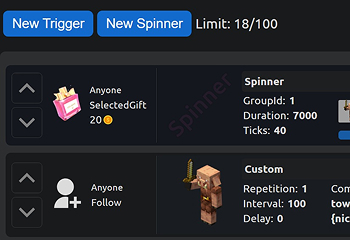
How to add a Spinner
In any of your presets/templates, a new button called New Spinner will appear. After selecting a trigger, a spinner event will appear in the event list. You can customize it individually by clicking on it.

How to add events
After a preset is added, the events get an additional column. To include an event in the spinner, set its drop chance.
- None: 0%
- Common: 60%
- Rare: 25%
- Epic: 10%
- Legendary: 5%

Two or more Spinners
If you add more than one spinner, all events (except for rarity) gain a group selection option. The group number determines which spinner the event participates in.

Spinner settings
Each spinner can be customized: change its style, add sounds, adjust the speed and duration of the animation. There are also two types of spins — one for testing with in-game events and another without events to preview the selected settings.
Don't forget to copy the overlay link and add it to TikTok Live Studio so viewers can see it.