S2E Colordrop Plugin

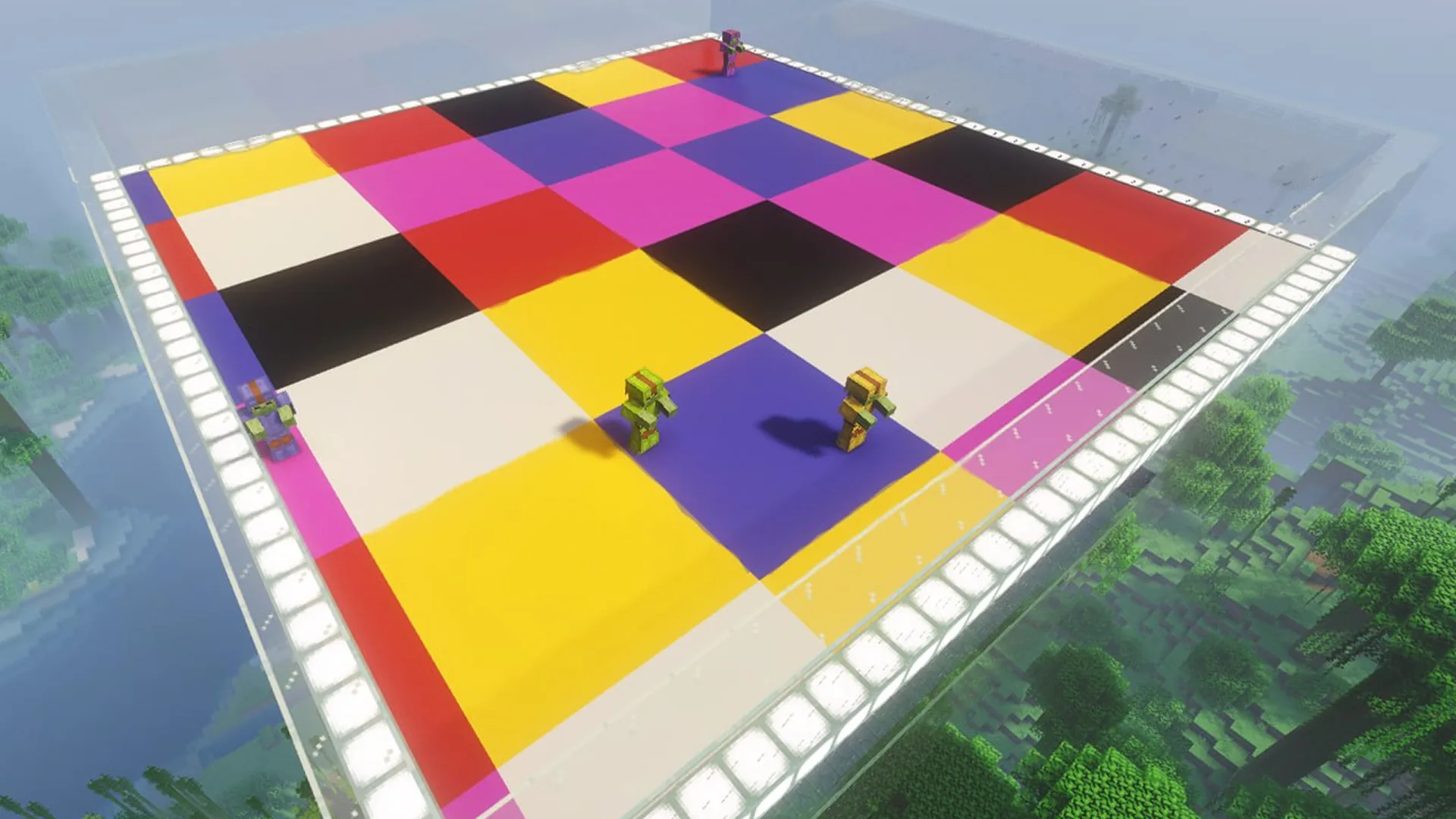
Find the matching color and stand on it before time runs out! All incorrect blocks will disappear, so be quick! Viewers can help or sabotage you by spawning NPCs and giving you misleading colors. Survive all stages and complete 3 final rounds to win!

Tải về choWindows

Minecraft Color Survival


A Minecraft plugin inspired by the classic Color Shuffle game mode!


Players receive a colored block and must quickly find and stand on a floor tile of the matching color before the timer runs out. When time is up, all blocks disappear except those matching the correct color!


Your viewers can either help you survive or make the challenge even harder. They can spawn NPCs with custom nicknames to participate in the game or give you an incorrect colored block to confuse you and cause you to fall!

Survive multiple challenging stages and complete all 3 final rounds to claim victory!


Stay focused, find the right color, and don't fall!

Lệnh

No image
/colordrop create [size]
Ví dụ: /colordrop create 31
Mô tả: Builds a dance floor over a pool at your current location and starts the game. Size ranges from 9 to 63 and defaults to 31.
No image
/colordrop create <size> <world> <x> <y> <z>
Ví dụ: /colordrop create 31 world 100 64 200
Mô tả: Builds the arena at the specified coordinates in the given world and starts the game. Use this form from the console.
No image
/colordrop delete
Ví dụ: /colordrop delete
Mô tả: Stops the game and removes the arena.
No image
/colordrop tp [player]
Ví dụ: /colordrop tp
Mô tả: Teleports the player onto the dance floor and puts them in Adventure Mode.
No image
/colordrop music <on|off>
Ví dụ: /colordrop music on
Mô tả: Turns the music on or off.
No image
/colordrop language <en|ru|uk>
Ví dụ: /colordrop language en
Mô tả: Sets the game language to English, Russian, or Ukrainian.
No image
/colordrop edit
Ví dụ: /colordrop edit
Mô tả: Opens edit mode.
/colordrop reset
/colordrop reset
Ví dụ: /colordrop reset
Mô tả: Restarts the game from round 1.
/colordrop goal <rounds>
Ví dụ: /colordrop goal 20
Mô tả: Sets the number of rounds before the final. The default is 20.
/colordrop lives <n>
Ví dụ: /colordrop lives 3
Mô tả: Sets the number of lives per attempt. The default is 3.
/colordrop life [n] {nickname}
Ví dụ: /colordrop life 1 {nickname}
Mô tả: Gives the player the specified number of extra lives.
/colordrop island [rounds] {nickname}
Ví dụ: /colordrop island 3 {nickname}
Mô tả: Creates a golden 2×2 island with the viewer’s avatar. The island stays in place when the floor drops.
/colordrop hint [rounds] {nickname}
Ví dụ: /colordrop hint 2 {nickname}
Mô tả: Makes tiles of the next target color sparkle before the announcement.
/colordrop parachute [n] {nickname}
Ví dụ: /colordrop parachute 1 {nickname}
Mô tả: Prevents the player from losing a life on each of the next n falls.
/colordrop skip [n] {nickname}
Ví dụ: /colordrop skip 1 {nickname}
Mô tả: Counts the specified number of rounds as survived.
/colordrop win {nickname}
Ví dụ: /colordrop win {nickname}
Mô tả: Gives the player an instant win.
/colordrop speed [seconds] {nickname}
Ví dụ: /colordrop speed 10 {nickname}
Mô tả: Gives the player Speed II for the specified number of seconds.
/colordrop fake [n] {nickname}
Ví dụ: /colordrop fake 1 {nickname}
Mô tả: Announces a fake target color, then announces the real one.
/colordrop shuffle [n] [name]
Ví dụ: /colordrop shuffle 1 {nickname}
Mô tả: Shuffles the floor tiles after the target color is announced.
/colordrop blackout [rounds] {nickname}
Ví dụ: /colordrop blackout 2 {nickname}
Mô tả: Darkens the floor immediately and reveals its colors one second before it drops.
/colordrop goat [n] {nickname}
Ví dụ: /colordrop goat 1 {nickname}
Mô tả: Spawns goats that ram the player.
/colordrop tnt [n] {nickname}
Ví dụ: /colordrop tnt 1 {nickname}
Mô tả: Detonates TNT to blast holes in the floor.
/colordrop meteor [n] {nickname}
Ví dụ: /colordrop meteor 1 {nickname}
Mô tả: Makes meteors strike the floor during the next color announcement.
/colordrop darkness [seconds] {nickname}
Ví dụ: /colordrop darkness 10 {nickname}
Mô tả: Applies Darkness and makes it look like nighttime for the player for the specified number of seconds.
/colordrop slowness [seconds] {nickname}
Ví dụ: /colordrop slowness 10 {nickname}
Mô tả: Gives the player Slowness II for the specified number of seconds.
/colordrop minus_life [n] {nickname}
Ví dụ: /colordrop minus_life 1 {nickname}
Mô tả: Takes away the specified number of lives.
/colordrop addround [n] {nickname}
Ví dụ: /colordrop addround 1 {nickname}
Mô tả: Adds the specified number of rounds before the final.
/colordrop dancer [n] {nickname}
Ví dụ: /colordrop dancer 10 {nickname}
Mô tả: Adds the viewer to the dance floor as a dancer.

Mẹo chung khi thiết lập server Minecraft

  • /gamerule keepInventory true — nhân vật của bạn không rơi vật phẩm và khối khi chết.
  • /gamerule sendCommandFeedback false — không hiển thị trên chat các lệnh mà server đang chạy.
  • /time set day — đặt thời gian ban ngày trên server.
  • /gamerule doDaylightCycle false — không chuyển đổi giữa ngày và đêm.
  • /gamerule doWeatherCycle false — mưa không chuyển sang nắng và ngược lại.
  • /weather clear — đặt thời tiết quang đãng trên server.
  • /gamemode creative — đổi chế độ chơi sang Creative.
  • /gamemode survival — đổi chế độ chơi sang Survival.

Các lệnh này chỉ hoạt động khi bạn là quản trị viên server (OP). Để tự cấp quyền quản trị, nhập vào terminal server: op NickName.